
Add cloud to existing systems
Upgrade your customers’ current CCTV with cloud.
 Login
Login
Help your customers upgrade to the cloud with a trusted solution built for modern video surveillance. Whether you’re a distributor, stockist, consultant, or CCTV installer, Videoloft makes it easy to offer a powerful, affordable cloud video solution to your customers, while strengthening your own service offering.
Compatible with most security cameras and recorders, the Videoloft Cloud Adapter connects your customer’s security system to Videoloft’s cloud platform, transforming it into a cloud VMS.
Our partner program is free to join and there’s no lengthy application process, just sign up below.
Upgrade your customers’ current CCTV with cloud.
One place to manage and support your customers.
Get alerts when your customers cameras go offline and diagnose issues remotely.
Get a 5 camera demo with 30 days cloud storage and a discounted Cloud Adapter.
We can handle recurring payments and pay your commission at every renewal.
Access reduced trade pricing so you can add your own margin.
Expert help whenever you need support or sales assistance.
Looking to expand your product range and meet growing demand for cloud-based CCTV? Videoloft makes it easy for distributors to stock and supply a trusted cloud video solution that works with the cameras and recorders your customers are already installing.

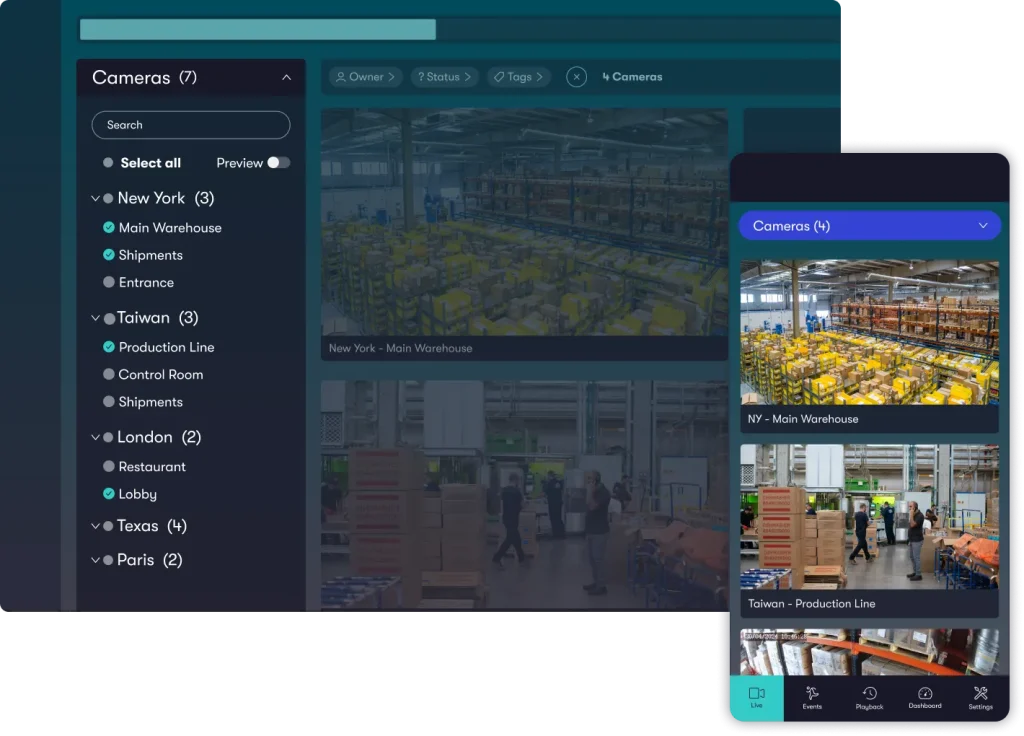
Use our generically named website and mobile app, CCTV Connect, to deliver Videoloft’s full functionality under your own brand.
It’s free and easy to set up – just send us your logo. When your customers log in, they’ll see your app icon, logo, and brand colours throughout the platform.
Partner Exclusive
When you sign up to be a registered Videoloft partner you’ll get immediate access to your own free demo account!
By using your demo account you can experience firsthand the features and capabilities of Videoloft. This experience will equip you with the knowledge needed to communicate these advantages to your customers.
As a Videoloft partner you have the opportunity to sign up to become a Videoloft Certified Professional.
At Videoloft, we frequently receive requests from end-users who need assistance setting up and installing Videoloft. As a Certified Professional, these customers will be directed to you – offering you the opportunity to grow your customer base.
To qualify, you should either have existing customers using Videoloft, or have your own cameras connected to a demo account using a Cloud Adapter or Virtual Cloud Adapter.

How does Videoloft work?
Videoloft connects your customer’s compatible security system to the cloud using a Cloud Adapter or Virtual Cloud Adapter. Our physical Cloud Adapter is a small bridging device, while the Virtual Cloud Adapter runs on a suitable Windows or Linux machine. Once your chosen adapter is running on the same network as the cameras, you can complete the setup through the Videoloft web VMS or app.
Once the setup is complete, your customers will be able to view their camera live stream and recorded video events through the Videoloft app and website. Recorded video events are saved in the Videoloft cloud for the duration of your cloud recording plan.
Do I have to meet certain criteria to become a partner?
Anyone who currently sells or installs compatible video surveillance systems can join our partner program!
Registering takes under 2 minutes and it’s completely free.
Can I remove my customer's local DVR/NVR completely?
Yes. With compatible IP cameras and either a Cloud Adapter or Virtual Cloud Adapter, you can record directly to the cloud without a local DVR or NVR.
What brands of security systems is Videoloft compatible with?
We’re compatible with most leading camera manufacturers including Hikvision, Dahua, Vivotek, Lorex, Uniview … as well as hundreds more via ONVIF. Visit our compatibility page for further information.
What price should I charge my customers?
We don’t have a recommended retail price. Our partners set their own end customer price to determine the margin they make. Our global network of partners charge a wide variety of prices to their end customers, but do contact us if you’d like advice on a specific installation. To see our trade list prices please register as a partner.
Do I have to use a Cloud Adapter?
You’ll need either a physical Cloud Adapter or our free Virtual Cloud Adapter software to connect your customer’s security system to the cloud. If you already have a suitable Windows or Linux machine on site, the Virtual Cloud Adapter lets you use that hardware.
No port forwarding is required to setup Videoloft cloud recording. Our software uses port 443 for motion event transmission over encrypted HTTPS, and port 554 for live transmission over encrypted RTSP. Custom ports can be used with Videoloft, but please ensure you re-run the installation from the Videoloft app if you change ports once the initial installation is complete.
To ensure the Cloud Adapter knows the correct IP address of the device it is connecting to, you’ll need to run the Videoloft installation process after physically installing the hardware at its final location. It is not possible to pre-configure the Cloud Adapter with the devices. However, you can install the Cloud Adapter remotely, as long as it is plugged into a network on site.
Yes, you can. You can set up your Cloud Adapter even if you're in Dallas and the adapter's in Tokyo. You do need your Cloud Adapter to see the cameras
Yes. Once the physical Cloud Adapter is connected, or the Virtual Cloud Adapter software is installed on a suitable machine on site, you can complete the setup remotely through the Videoloft web VMS or mobile app. Either option needs access to the cameras on the local network and an internet connection.
Yes. We offer a variety of white label options, including:
The Videoloft app is a co-branded solution. Upload your logo and contact details into the partner portal and they’ll show to your customers inside the Videoloft app. The rest of the app is Videoloft branded, but your customers will see your logo and you’ll be listed as the contact.
The CCTV Connect app has exactly the same functionality but a more generic name. As a result, it’s easier for you to pitch it to your customers as the “ABC Installer CCTV Connect”. We can also build your brand and company colours into this app. Then when your customers log in it’ll appear completely like your software. On Apple devices we can even change the app icon to your logo, however, this feature isn’t available on Android yet.
No, there is no charge.
Contact us and send us a high-resolution logo file. We’ll send you a visual mockup to approve, then it takes a few days to build into the app. We usually release a new app version every fortnight, so you won’t have long to wait to try it out.